Why this tool matters
If your browser currently looks like a jagged mountain range of tiny icons where you can’t tell your gradebook from your Pinterest board, we need to talk. Tab overload is a cognitive drain. For those of us juggling five preps and a side hustle, every second spent hunting for that one YouTube link is a second we aren’t drinking coffee.
What is the tool?
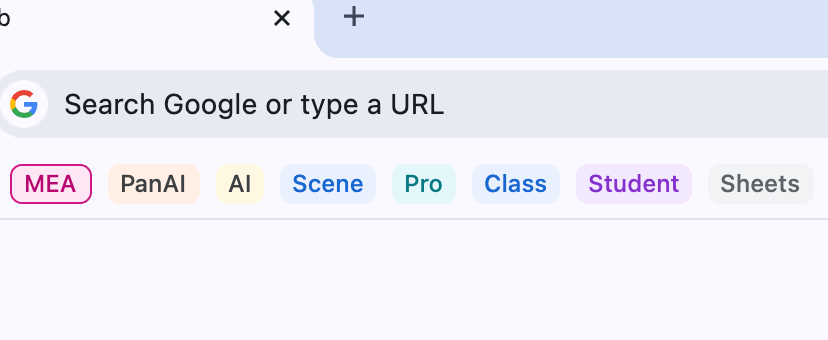
Chrome Tab Groups is the built-in feature that lets you corral those wild tabs into neat, color-coded, and collapsible folders directly on your bookmarks bar. It has recently leveled up with native Split View and vertical tab options (if you are feeling adventurous), making it less of a browser feature and more of a full-blown workspace.
How teachers might use it
You can use these for your active Right Now tasks. Imagine grouping all your 2nd-period Google Slides, your digital hall pass, and the attendance portal under one blue dot. When the bell rings and you’ve survived another hour, you click that dot, the tabs collapse out of sight, and you regain your sanity for 3rd period. It is also a lifesaver for Grading Marathons, where you can group all your rubrics and student submissions in one place.
The strengths of the tool
The biggest strength is that it’s already there. No extensions to install, no accounts to create, and no IT department to beg for permission. It’s fast, it syncs across your devices, and it now supports saving groups. This means you can close your computer on Friday, open it on Monday, and your Monday Morning Routine group is waiting for you exactly where you left it.
Limitations of the tool
While it’s getting better, Chrome still loves to eat RAM for breakfast. If you have ten groups open with fifty tabs tucked inside, your computer fan might start sounding like it’s preparing for takeoff. It also lacks some of the deep session history that specialized tools have. Also, if you accidentally delete a group without saving it, it can feel like losing a student’s permission slip in a messy backpack.
The AI behind the tool
Google has integrated its Gemini-powered “Organize Tabs” feature. If you have a mess of tabs open, you can right-click and ask Chrome to organize them for you. It uses AI to recognize that five of those tabs are about “High School AI Policy” and three are about “Peanut Butter Cookie Recipes,” grouping them automatically. It’s not quite grading papers yet, but it’s a solid digital assistant.
Equity and Human-Centered Lens
From an equity standpoint, this is a win because it’s free and built into the ecosystem our students already use. Teaching our students how to use tab groups is a hidden executive functioning skill. For the teacher, the human-centered part is about boundaries. Being able to collapse work tabs when you are done for the day is a small but powerful way to reclaim your mental space.
Is it worth the teacher’s time?
Absolutely. It takes about three seconds to learn and zero dollars to use. If you are a minimalist who just wants to clean up the visual noise of your day, this is the single best habit you can pick up. It reduces the where was that link frustration and gives you back those precious minutes of your planning period.
Call to action
Go to your browser right now and right-click on a tab. Select “Add tab to new group,” give it a color (I like pink for the “Chaos” group), and then click the name to collapse it. If that feels like a weight being lifted off your shoulders, you’re welcome. Now, go find that coffee you forgot in the microwave.If you want to move beyond just organizing your tabs and start building a human-centered AI strategy for your building or district, let’s chat. I’m currently booking consulting sessions and workshops for the 2026-2027 school year through Paula Johnson Tech. You can find my booking link here.


Leave a Reply